e-Buy 收银一体化 英文
Introduction
Purpose
This is a integration system protocol between Cashier Terminal and Backend system.
To enable the Cashier Terminal and e-Buy backend payment and redemption business real-time transaction process and synchronization, reduce reconciliation errors, facilitate business transaction in real-time integration to e-Buy backend system, in order to support multiple business transaction demand, such as multiple payment method and redemption method.
Physical Architecture
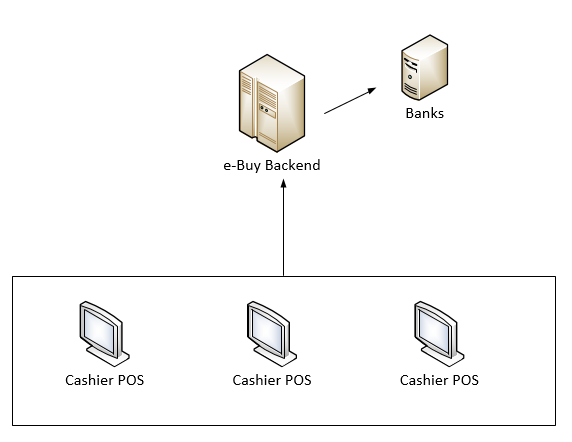
Network illustration:
- 1.Cashier POS and MIS-POS integration is thru USB port or serial port, each Cashier Terminalis thru network connection.
- 2.Each store (include 1 or more cashier POS) is connected thru Public VPN back to e-Buy Backend.
- 3.e-Buy Backend is connected to each Credit card banking system thru leased line.
Logic Architecture
@startuml
skinparam monochrome reverse skinparam sequence { ParticipantFontSize 24 ActorFontSize 24 ArrowFontSize 22 GroupFontSize 20 }
participant "Cashier POS" participant "e-Buy Backend" #99FF99
"Cashier POS" -> "e-Buy Backend" : 1.Request ||| "e-Buy Backend" -> "Cashier POS" : 2.Response ||| ||| @enduml
Flow illustration:
- 1.Cashier POS initiates the payment transaction, including the related transaction information to push to the e-Buy Backend.
- 2.e-Buy Backend will process as per type of transaction provided. If required, corresponding data will send to the Card Issued Organization to process accordingly. At final, will return back the result to the Cashier POS.
Glossory
Socket
Communication is based on TCP/IP
MIS-POS
Installed in merchants in-store POS machine, providing the operation activity to support and exchange function
e-Buy POSP
A group / set of network equipment and server to process e-Buy POS all transaction activity
BCD
Binary numeric representation format, such as 0x99, it represents the value of 99
TLV
Communication protocol commonly used data formats, Comprise 3 parts: "Tag", "Length" & "Value"
PINPAD
PIN entry device
e-Buy POS
Same as MIS-POS, the device is installed in merchant on-site, providing the operation activity to support and exchange function
e-Buy Backend
A group /set of equipment / server to process all the transaction from e-Buy POS
Middleware
Individual operation in cashier terminal, monitoring the local port, it will also download the key and auto sign in, auto update and prompt transaction options
API Introduction
Invoke Method
| Content | Description |
|---|---|
| Protocal | HTTP/HTTPS |
| HTTP Method | POST (application/json) |
| Message Type | JSON |
| Charset | UTF-8 |
| Signature Algorithm | MD5 |
| Signature Verify | Request and Response are both required |
Message Structure
Request and response message are both use following structure
| No. | Parameter | Format | Reference | Description | Memo |
|---|---|---|---|---|---|
| 1 | action | String | inquiry | Transaction Type | The specific interfaces with detail description |
| 2 | deviceNo | String | POS01 | Cashier Terminal No. | To identify the Cashier Terminal used in this transaction |
| 3 | shopNo | String | CN123456 | Shop No. | To identify the merchant / shop in this transaction |
| 4 | brand | String | 663 | Brand No. | To identify the Brand used in this transaction, allocated by e-Buy |
| 5 | body | String | BASE64 | Message Detail | The specific interfaces with detail description |
| 6 | mwVersion | String | 20161010 | Middleware Version | The Middleware is compatible to process with different backend system |
| 7 | ptlVersion | String | 20161010 | Protocal Version | The protocol is compatible to process with different backend system |
| 8 | posVersion | String | 20161010 | e-Buy POS Version | The e-Buy POS is compatible to process with different backend system |
| 9 | timestamp | String | 1483372334 | Unix Format | Unit : second,中间件需要在收到返回时同步该时间 |
| 10 | sign | String | 7E65B60DCFA42B04 | Signature | See detail : Signature Algorithm |
example
 {
     "action" : "inquiry",
     "deviceNo" : "POS01",
     "shopNo" : "CN123456",
     "brand" : "663",
     "body" : "ewogICAgICAgICAidHJhY2VObyI6ICI5OTAwMDAwOTEwMDAxMDEwMTczMjEyMyIsCiAgICAgICAgICJvcmlnaW5hbFRyYWNlTm8iOiAiOTkwMDAwMDkxMDAwMTAxMDE3MzIxMjQiCiAgICAgfQ==",
     "mwVersion" : "20161010",
     "ptlVersion" : "20161010",
     "posVersion" : "20161010",
     "timestamp" : "1483372334",
     "sign" : "7E65B60DCFA42B04"
}Signature process
-
Combine message parameter All parameter must be by ASCII sequential order, except sign and body. Take the “ parameter number 1 = parameter value 1, parameter number 2 = parameter value 2” to connect all parameters.
-
Combine mwMacKey Sign in KEY will place to the last parameter with agreed key “KEY=xxxxx”. Before downloadKey,we do not have mwMacKey,so we use assigned key when invoke downloadKey. Before signin,we do not have mwMacKey,so we use mwTmk when invoke signin.
-
Signature Sign in value calculate per MD5-32 encryption and then converted to HEX in capital letter, named Sign-in value, as sign parameter.
-
PS when parameter value is null or blank, the parameter is not required to stated
example
 {
     "action" : "inquiry",
     "deviceNo" : "POS01",
     "shopNo" : "CN123456",
     "brand" : "663",
     "body" : "ewogICAgICAgICAidHJhY2VObyI6ICI5OTAwMDAwOTEwMDAxMDEwMTczMjEyMyIsCiAgICAgICAgICJvcmlnaW5hbFRyYWNlTm8iOiAiOTkwMDAwMDkxMDAwMTAxMDE3MzIxMjQiCiAgICAgfQ==",
     "mwVersion" : "20161010",
     "ptlVersion" : "20161010",
     "posVersion" : "20161010",
     "timestamp" : "1483372334",
     "sign" : "F38545F4D74B5C10A9EBBC053ED9D1CF"
 }
mwMacKey
94365019BBF9CEEAB0DF658E67754A70
Combine message parameter
action=inquiry&body=ewogICAgICAgICAidHJhY2VObyI6ICI5OTAwMDAwOTEwMDAxMDEwMTczMjEyMyIsCiAgICAgICAgICJvcmlnaW5hbFRyYWNlTm8iOiAiOTkwMDAwMDkxMDAwMTAxMDE3MzIxMjQiCiAgICAgfQ==&brand=663&deviceNo=POS01&mwVersion=20161010&posVersion=20161010&ptlVersion=20161010&shopNo=CN123456×tamp=1483372334
Combine KEY
action=inquiry&body=ewogICAgICAgICAidHJhY2VObyI6ICI5OTAwMDAwOTEwMDAxMDEwMTczMjEyMyIsCiAgICAgICAgICJvcmlnaW5hbFRyYWNlTm8iOiAiOTkwMDAwMDkxMDAwMTAxMDE3MzIxMjQiCiAgICAgfQ==&brand=663&deviceNo=POS01&mwVersion=20161010&posVersion=20161010&ptlVersion=20161010&shopNo=CN123456×tamp=1483372334&KEY=94365019BBF9CEEAB0DF658E67754A70
Signature F38545F4D74B5C10A9EBBC053ED9D1CF
Encryption Algorithm
3DES Introduction
-
In cryptography, Triple DES (3DES), officially the Triple Data Encryption Algorithm (TDEA or Triple DEA), is a symmetric-key block cipher, which applies the Data Encryption Standard (DES) cipher algorithm three times to each data block.
-
The original DES cipher's key size of 56 bits was generally sufficient when that algorithm was designed, but the availability of increasing computational power made brute-force attacks feasible. Triple DES provides a relatively simple method of increasing the key size of DES to protect against such attacks, without the need to design a completely new block cipher algorithm.
Algorithm
Triple DES uses a "key bundle" that comprises three DES keys, K1, K2 and K3, each of 56 bits (excluding parity bits). The encryption algorithm is:
ciphertext = EK3(DK2(EK1(plaintext))) I.e., DES encrypt with K1, DES decrypt with K2, then DES encrypt with K3.
Decryption is the reverse:
plaintext = DK1(EK2(DK3(ciphertext))) I.e., decrypt with K3, encrypt with K2, then decrypt with K1.
Each triple encryption encrypts one block of 64 bits of data.
In each case the middle operation is the reverse of the first and last. This improves the strength of the algorithm when using keying option 2, and provides backward compatibility with DES with keying option 3.
Keying options
The standards define three keying options:
Keying option 1 All three keys are independent. Keying option 2 K1 and K2 are independent, and K3 = K1. Keying option 3 All three keys are identical, i.e. K1 = K2 = K3. Keying option 1 is the strongest, with 3 × 56 = 168 independent key bits.
Keying option 2 provides less security, with 2 × 56 = 112 key bits. This option is stronger than simply DES encrypting twice, e.g. with K1 and K2, because it protects against meet-in-the-middle attacks.
Keying option 3 is equivalent to DES, with only 56 key bits. It provides backward compatibility with DES, because the first and second DES operations cancel out. It is no longer recommended by the National Institute of Standards and Technology (NIST),[5] and is not supported by ISO/IEC 18033-3.
Each DES key is nominally stored or transmitted as 8 bytes, each of odd parity,[12] so a key bundle requires 24 bytes for option 1, 16 for option 2, or 8 for option 3.
Encryption example
Set pinKey: 9D93D15D6A3913AB4151C456A80841EF:
K1 = 9D93D15D6A3913AB
K2 = 4151C456A80841EF
K3 = 9D93D15D6A3913AB
Data M in HEX:3132333435363738,encryption process:
DES1_RESULT = Ek(M,K1)
DES2_RESULT = Dk(DES1_RESULT,K2)
C = Ek(DES2_RESULT,K3)
Result C:C63AABF759BDE968
Decryption example
Set pinKey: 9D93D15D6A3913AB4151C456A80841EF:
K1 = 9D93D15D6A3913AB
K2 = 4151C456A80841EF
K3 = 9D93D15D6A3913AB
Data C in HEX:C63AABF759BDE968,decryption process:
DES1_RESULT = Dk(C,K3)
DES2_RESULT = Ek(DES1_RESULT,K2)
M = Dk(DES2_RESULT,K1)
Results M:3132333435363738
Password Encryption
ANSI X9.8 Format(带主帐号信息)
- PIN BLOCK 格式:等于 PIN 按位异或主帐号
-
PIN 格式:(个人识别码 Personal Identity Number)总共有8个byte长度,分为两个部分;(类似数据包的格式)
Byte 1 PIN的长度 Byte 2 – Byte 3/4/5/6/7 4--12个PIN(每个PIN占4个BIT) Byte4/5/6/7/8 – Byte 8 FILLER “F” (每个“F“占4个BIT) -
PAN(主帐号 Primary Account Number)同样包含8个byte,格式如下:
Byte 1 — Byte 2 0x00 0x00
Byte 3 — Byte 8 12个主帐号字符(最后一位为校验位)
12位字符主帐号的取法:取主帐号的右12位(不包括最右边的校验位),不足12位左补“0X00”。
加密举例
- 明文 PIN:
123456 - 主帐号 PAN:
123456789012345678 - 截取下的主帐号为:
678901234567(最后一位校验位8的前12位字符为截取的主帐号) - 则用于PIN加密的主帐号为:
0x00 0x00 0x67 0x89 0x01 0x23 0x45 0x67 - 则 PIN BLOCK (PIN按位异或主帐号PAN)
即是为:  0x06 0x12 0x34 0x56 0xFF 0xFF 0xFF 0xFF
异或上:  0x00 0x00 0x67 0x89 0x01 0x23 0x45 0x67
结果为:  0x06 0x12 0x53 0xDF 0xFE 0xDC 0xBA 0x98
Parameter Object
Card Info
- JSON Key is
cardInfo, only in Request message, not mandatory
| Field | Type | Mandatory | Description | Memo |
|---|---|---|---|---|
| cardNo | String | Yes | Card No | Mandated for Credit Card payment transaction |
| password | String | No | Password | Mandated when password is required, apply Financial encryption |
| valid | String | No | Valid Date | Mandated for Credit Card payment transaction, format : YYMM |
| track1 | String | No | Track 1 | |
| track2 | String | No | Track 2 | Mandated for Credit Card payment transaction, apply financial encryption |
| track3 | String | No | Track 3 | |
| cardSn | String | No | IC Serial | Mandated for credit card payment transaction, such as IC card, apply Financial encryption |
| icData | String | No | IC Data | Mandated for credit card payment transaction, such as IC card, apply Financial encryption |
| cardType | String | No | Card Type | See details |
| tc | String | No | Transaction Certificate | Transaction Certificate |
cardNo encryption
- cardNo 3DES Encryption with pinKey,result format is HEX,see:Encryption Algorithm
password encryption
- password ANSI X.98 Encryption with pinKey,result format is HEX,see:Password Encryption
track1 encryption
- track1 3DES Encryption with pinKey,result format is HEX,see:Encryption Algorithm
track2 encryption
- track2 3DES Encryption with pinKey,result format is HEX,see:Encryption Algorithm
track3 encryption
- track3 3DES Encryption with pinKey,result format is HEX,see:Encryption Algorithm
cardType Details
- 00 magnetic stripe card
- 01 IC card
- 02 NFC IC card
- 03 Manully enter card Number
- 04 scan qrcode
- 05 other type
- 06 collected by Cashier POS
- 07 Apple Pay
- 08 Samsung Pay
- 09 Huawei Pay
- 10 Mi Pay
Goods Detail
- JSON Key为
goodsDetail, mandatory
| Field | Type | Mandatory | Description | Memo |
|---|---|---|---|---|
| goodsCategory | String | Yes | Goods Category | |
| goodsId | String | Yes | Goods ID | |
| goodsName | String | Yes | Goods Name | Used for report , receipt, slip printing |
| goodsSpec | String | No | Goods Spec | Shows in report or receipt |
| price | Price | Yes | Price | Unit : dollar |
| quantity | Integer | Yes | Quantity | |
| rebateCode | String | No | Rebate Code | Cashier Terminal has pre-set the discount, mandated |
| activityNo | String | No | Activity No | Once e-Buy backend system confirm transaction success, a transaction activity number will return back |
| memo | String | No | Memo | Once e-Buy backend system confirm transaction success, some information will return such as electronic voucher number |
| voucherId | String | No | Voucher ID | Return when have voucher_detail |
Fund Channel
- JSON Key is
fundChannel, only in Response message, not mandatory
| Field | Type | Mandatory | Description | Memo |
|---|---|---|---|---|
| channelNo | String | Yes | Channel No | Channel No |
| channelName | String | Yes | Channel Name | Channel Name |
| channelAmount | Price | Yes | Channel Amount | Channel Amount |
| sectionNo | String | No | Section no | Distribution by financial staff, can be entry into the cash register after matching |
- supported fund channel:
| channelNo | channelName | Description |
|---|---|---|
| user_real_money | User paid real money | Example:Alipay balance、Alipay Yuebao、Wechat balance、Debit Card or Credit card etc. |
| user_balance | paid by user balance | Example:Alipay balance、Alipay Yuebao、Wechat balance etc. |
| user_bank_card | paid by user bank card | Example:Debit Card or Credit card |
| user_credit | paid by user e-Wallet credit | Example:Alipay huabei,Jingdong credit |
| user_points | paid by user points | Example:Credit card points,Tmall Points etc. |
| merchant_benefit | the benifit provided by merchant | Example:Merchant discount,Merchant voucher etc. |
| platform_benefit | the benifit provided by enterprise | Example:Payment platform discount, Payment platform voucher etc. |
| ebuy_benefit | the benifit provided by e-Buy | Example:e-Buy discount, e-Buy voucher etc |
Print Detail
- JSON Key is
printDetail, only in Response message, not mandatory
| Field | Type | Mandatory | Description | Memo |
|---|---|---|---|---|
| cardNo64 | String | No | The card number (first 6 digits and last 4 digits | The card number (first 6 digits and last 4 digits) is required to print as part of return message |
| bank | String | No | Credit Card issued organization | The Credit Card issued organization is required to print as part of return message |
| bankTid | String | No | Bank Terminal ID | Responsed when UnionPay with JLCashPay |
| bankMid | String | No | Bank Merchant ID | Responsed when UnionPay with JLCashPay |
| paymentOrderNo | String | No | Payment Order no. | Payment order no. is required to print as part of return message |
| paymentUser | String | No | User account | User account need be printed. |
| pointSale | String | No | Point deducted | Point deducted is required to print as part of return message |
| qrCode1 | String | No | Print QR code 1 | QR code 1 is required to print as part of return message |
| qrCode2 | String | No | Print QR code 2 | QR code 2 is required to print as part of return message |
| qrCode3 | String | No | Print QR code 3 | QR code 3 is required to print as part of return message |
| barCode1 | String | No | Print Bar Code 1 | Bar Code code 1 is required to print as part of return message |
| barCode2 | String | No | Print Bar Code 2 | Bar Code code 2 is required to print as part of return message |
| barCode3 | String | No | Print Bar Code 3 | Bar Code code 3 is required to print as part of return message |
| content | String | No | Print Content | TLV Format,1F=Receipt title,2F=Receipt transtype |
| printMode | String | No | Print Mode | 1=1 Receipt,2=2 Receipts,3=3 Receipts |
Member Detail
- JSON Key is
memberDetail, not mandatory
| Field | Type | Mandatory | Description | Memo |
|---|---|---|---|---|
| memberId | String | Yes | Member ID | |
| memberCode | String | Yes | Member Code | |
| memberName | String | Yes | Member Name | |
| memberPhone | String | No | Member Mobile | |
| grade | String | No | Member Grade | |
| status | String | No | Member Status | |
| balance | String | No | Balance | |
| pointBalance | String | No | Point Balance |
Settle Record
- JSON Key is
settleRecord, not mandatory
| Field | Type | Mandatory | Description | Memo |
|---|---|---|---|---|
| activityNo | String | Yes | Activity No | |
| activityName | String | Yes | Activity Name | |
| productName | String | Yes | Product Name | |
| customer | String | Yes | Settle Customer | |
| isRefund | Boolean | Yes | Is Refund | |
| volume | Integer | Yes | Transaction Volume | |
| totalReceiptAmount | Price | Yes | Merchant Receipt Amount | |
| totalAmount | Price | Yes | Total Amount |
Trans Record
- JSON Key is
transRecord, mandatory
| Field | Type | Mandatory | Description | Memo |
|---|---|---|---|---|
| traceNo | String | Yes | Cashier terminal trace no. | |
| paidAmount | String | Yes | Paid Amount | |
| status | String | Yes | Match status | See detail |
status
- 0 Initial
- 1 paidAmount e-Buy Backend = request
- 2 paidAmount e-Buy Backend > request
- 3 paidAmount e-Buy Backend < request
- 4 Does not exist in e-Buy Backend
- 5 Failed in e-Buy Backend
- 6 Reversed in e-Buy Backend
- 7 Rollbacked in e-Buy Backend
- 8 Refunded in e-Buy Backend
- 9 e-Buy Backend process failed
- 10 e-Buy Backend has, but Does not exist in Cashier POS
Activity Product List
- JSON Key is
activityProductList, mandatory when prompt transaction options
| Field | Type | Mandatory | Description | Memo |
|---|---|---|---|---|
| activityProductNo | String | Yes | Activity Product No. | |
| activityProductName | String | Yes | Activity Product Name | |
| command | String | No | responsed commands in menus | |
| showOrder | String | Yes | Show order | Show as A-Z |
Trans Timestamp
- JSON Key is
transTimestamp, mandatory
| Field | Type | Mandatory | Description | Memo |
|---|---|---|---|---|
| traceNo | String | Yes | Original trace no. | |
| send | String | Yes | Send timestamp | Unix Format,Unit:seconds |
| recv | String | Yes | Receive timestamp | Unix Format,Unit:seconds |
Trans Info
- JSON Key is
transInfo, mandatory
| Field | Type | Mandatory | Description | Memo |
|---|---|---|---|---|
| action | String | Yes | 交易action | |
| traceNo | String | Yes | Cashier terminal trace no. | |
| orderNo | String | Yes | 易百系统参考号 | |
| transDate | String | Yes | 交易时间 | 格式:yyyyMMddHHmmss |
| returnCode | String | Yes | Return code | 00 represent successful transaction, else represent fail |
| returnDesc | String | Yes | Return message | Detail explanation / error message per transaction result |
| paidAmount | String | Yes | 交易成功金额 | |
| activityProductNo | String | Yes | 活动产品编号 | |
| activityProductName | String | Yes | 活动产品名称 | 活动名称+产品名称 |
| bank | String | Yes | 交易机构标识 | |
| cardNo64 | String | Yes | 卡号或串码 | |
| printContent | String | Yes | 小票打印数据 |
Function Menu
- JSON Key is
function, only in Response message
| Field | Type | Mandatory | Description | Memo |
|---|---|---|---|---|
| iconUrl | String | Yes | icon URL | variable-length field |
| title | String | Yes | Function Name | variable-length field |
| action | String | Yes | Function Action | variable-length field |
| command | String | Yes | Commands in Menus | Such as:04|00|Please Swipe card|1|08|00|Product XXX(M)$HDCP00000000072578|0| |
| childrenFunc | List<function> | No | Nodes in Menus | variable-length field |
Head Picture
- JSON Key is
headPicture, only in Response message
| Field | Type | Mandatory | Description | Memo |
|---|---|---|---|---|
| displayPicUrl | String | Yes | Picture URL in Banner | variable-length field |
| linkUrl | String | Yes | Link URL | variable-length field |
Package Detail
- JSON Key is
packageDetail, only in Response message
| Field | Type | Mandatory | Description | Memo |
|---|---|---|---|---|
| packId | String | Yes | Package ID | variable-length field |
| packName | String | Yes | Package Name | |
| goodsInfoList | List<goodsDetail> | Yes | Goods Detail List |
Order Info
- JSON Key is
orderInfo, only in Response message, mandatory
| Field | Type | Mandatory | Description | Memo |
|---|---|---|---|---|
| appOrderNo | String | Yes | APP Order No | variable-length field |
| statusCode | String | Yes | Order Status Code | variable-length field |
| status | String | Yes | Order Status Desc | Order Status Desc |
| orderTime | String | Yes | Order Time | Format:HH:mm, shows in Order List |
| orderCreateTime | String | Yes | Order Create Time | Format:yyyy-MM-dd HH:mm:ss |
| orderAmount | Price | Yes | Order Amount | |
| rcptName | String | Yes | Receiver | |
| platformName | String | Yes | Tokeout Platform | variable-length field, Such as: Baidu, Meituan, less than 8 characters |
| packageDetailList | List<packageDetail> | No | Package Detail | Responsed when Order Detail API called |
Voucher Detail
- JSON Key为
voucherDetail, mandatory
| Field | Type | Mandatory | Description | Memo |
|---|---|---|---|---|
| voucherId | String | Yes | Voucher ID | |
| voucherName | String | Yes | Voucher Name | Used for reports, tickets, etc. |
| voucherType | String | Yes | Voucher Type | |
| voucherAmount | Price | Yes | Price | Unit : dollar |
| voucherCode | String | Yes | Voucher Code |